Showing posts with label poEdit. Show all posts

2013-01-24

Making localization by using poEdit (WordPress)


When you need to translate "Open Source" program, you'll need special tool. Forexample: if you want to translate blog tool WordPress to your native language.

If you want to translate it, you'll need following qualificatins:

  • You need to be truly bilingual -- fluent in both written English and the language(s) you will be translating into. Casual knowledge of either one will make translating difficult for you, or make the localization you create confusing to native speakers.
  • You need to be familiar with PHP, as you will sometimes need to read through the WordPress code to figure out the best way to translate messages.
  • You should be familiar with human language constructs: nouns, verbs, articles, etc., different types of each, and be able to identify variations of their contexts in English.
Terms used in Localization
POT (Portable Object Template) files
The first step in the localization process is that a program is used to search through the WordPress source code and pick out every message passed into a __() or _e() function. This list of English-language messages is put into a specially-formatted template file (POT file) that forms the basis of all translations. Generally, you can download a POT file for WordPress, so you shouldn't have to generate your own. Separate POT files can also be made for themes and plugins, if the theme/plugin developer has enclosed all text in __() or _e() functions.
PO (Portable Object) files
The second step in the localization process is that the translator translates all the messages from the POT file into the target language, and saves both English and translated messages in a PO file.
MO (Machine Object) files
The final step in the localization process is that the PO file is run through a program that turns it into an optimized machine-readable binary file (MO file). Compiling the translations to machine code makes the localized program much faster in retrieving the translations while it is running.
Localization tool "poEdit" 

An open source program for Windows, Mac OS X and UNIX/Linux which provides an easy-to-use GUI for editing PO files and generate MO files.

Translating With poEdit (Let me remind you our chosen example is WordPress.)
  1. Download and install poEdit. Download!
  2. Download the official WordPress POT file.
  3. Open the file in poEdit.
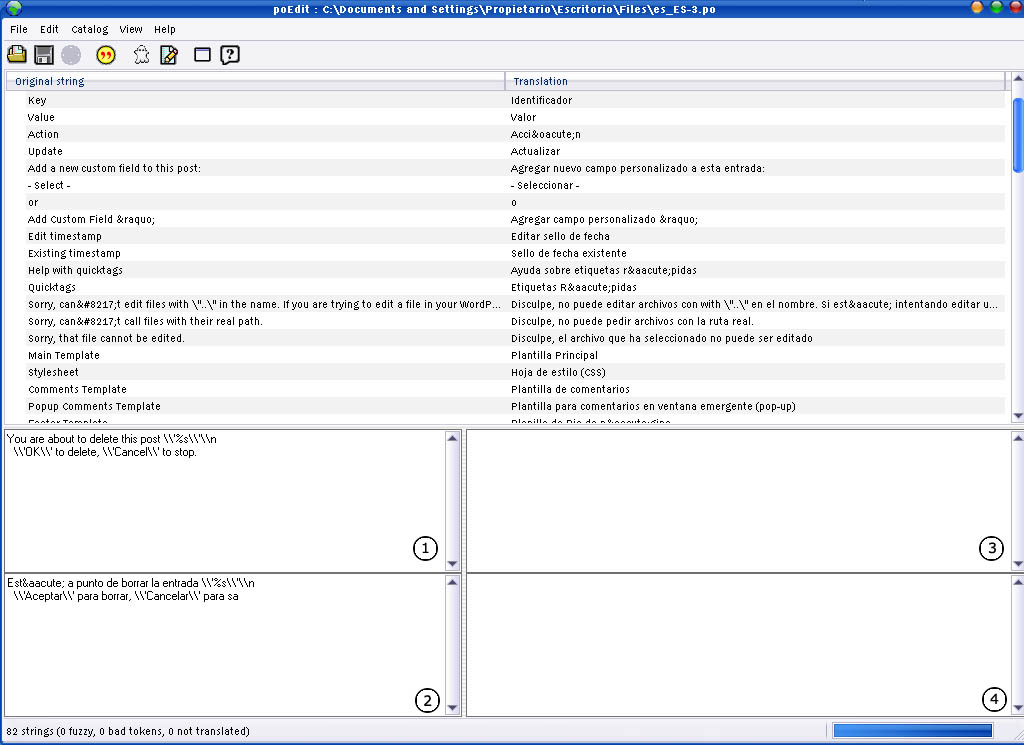
  4. (See Image) The box labeled (1) is the original message (in English) from the POT file. The box labeled (2) is where you add your translation. Boxes labeled (3) and (4) are used for adding comments about the messages. These come in handy if you are working with a team of translators and would like to pass around ideas through the PO file.
  5. Go to File → Save as… to save your translations in a PO file.
  6. When you are finished translating, go to File → Save as… again to generate the MO file.
  7. Or you can set your poEdit to always compile a MO file when saving changes by clicking File → Preferences and on the Editor tab check the Automatically compile .mo file on save box.

2013-01-20

poEdit ашиглан локализаци хийх (WordPress)

Open Source програмыг эх хэл рүүгээ хөрвүүлэхийн тулд тусгай хэрэгсэл шаардлагатай болдог. Жишээлбэл: WordPress блог tool-ийг эх хэл рүүгээ хөрвүүлье гэвэл.

Хөрвүүлэх гэж байгаа хүн дараах зүйлсийг анхаарах ёстой:
  • Хос хэлтэн байх хэрэгтэй -- Англи хэл болон өөрийн төрөлх хэлний бичгийн чадвар маш сайн байх хэрэгтэй. Учир нь аль нэгийг сайн мэдэхгүй бол та орчуулахад хэцүү байхаас гадна буруу орчуулга хийж магадгүй.
  • Тухайн програмыг хийхэд ашигласан програмчлалын, скрипт хэл, технологийн талаар мэдлэгтэй байх хэрэгтэй. WordPress-ийн хувьд бол PHP скрипт хэл. 
  • Та англи хэлний бүтцийг сайн мэддэг байх шаардлагатай. Жишээлбэл: тухайн үг нэр үг, үйл үг алин болохыг ялгах чадвартай байх.
Локализаци хийхэд мэдэх шаардлагатай нэр томьёонууд:

POT (Portable Object Template) файлууд
Локализаци хийх анхны алхам бол програм WordPress-ийн эх код дундаас a __() эсвэл _e() функц руу дамжуулагдаж бүх мессажийг хайж олж утгуудыг авах юм. Эдгээр англи хэл дээрхи мессажуудыг жагсаалт болгон тусгай форматтай загвар файлд (POT файл) бүх орчуулгын үндэс болгон оруулна. Та WordPress-т зориулсан POT файлыг авсанаар өөрөө үүсгэх шаардлагагүй болно. Хэрэв theme/plugin хөгжүүлэгч бүх текстээ __() or _e() функцаар хааж өгсөн бол themes болон plugin-нуудад зориулсан тусдаа POT файл үүсгэж болно.

PO (Portable Object) файлууд

Удаах алхам бол орчуулагч POT файлд байгаа бүх мессажийг тухайн хэл рүү хөрвүүлэн Англи болон хөрвүүлэгдсэн мессажийг PO файланд хадгалах юм.

MO (Machine Object) файлууд

Сүүлийн алхам бол PO файлыг програмаар боловсруулан машин уншихад зориулсан 2-тын тоон файл (MO file) болгох юм. Машины код болгон хувиргахын ач холбогдол тухайн локал програм ажиллаж байх үедээ хурдан хугацаанд орчуулгатай ажиллах боломжийг олгоход оршино.

"poEdit" локализаци хийх хэрэгсэл

Энэ нь Windows, Mac OS X, UNIX/Linux үйлдлийн системд зориулсан PO файлыг засварлан, MO файлыг үүсгэдэг, ашиглахад хялбар график интерфэйстэй (GUI) open source програм юм. 

poEdit ашиглан орчуулга хийе гэвэл (WordPress дээр жишээ авч байгаагаа дахин сануулъя.)
  1. poEdit-ийг татаад, түүний дараа суулга. Энд дарж татна уу!
  2. WordPress албан ёсны POT файлыг тат.
  3. poEdit дээрээс POT файлаа нээ.
  4. (Зургаас хар) (1)-р хэсэгт POT файлаас авсан эх мессажууд (англи хэл дээр) байна. (2)-р хэсэгт орчуулгаа бичих болно. (3) болон (4)-р хэсэгт тухайн мессажийн талаар тайлбар бичихэд ашиглана. Дээрхи хэсгүүд багаар ажиллах үед зүгээр. Та PO файлаар дамжуулан санаагаа бусад орчуулж байгаа хүмүүст хүргэх болноо. 
  5. File → Save as… гэж PO файл дээрхи орчуулгаа хаана хадгалахаа зааж өг.
  6. Орчуулж дууссаныхаа дараа File → Save as… гэж дахин сонгон MO файлаа үүсгэ.
  7. Эсвэл та poEdit-ээ хадгалахад болгонд үргэлж MO файл үүсгэдгээр тохиргоо хийж болно. Ингэхийг хүсвэл File → Preferences орон Editor tab дээрээс Automatically compile .mo файлийг чагтална уу.