When you need to translate "Open Source" program, you'll need special tool. Forexample: if you want to translate blog tool WordPress to your native language.
If you want to translate it, you'll need following qualificatins:
- You need to be truly bilingual -- fluent in both written English and the language(s) you will be translating into. Casual knowledge of either one will make translating difficult for you, or make the localization you create confusing to native speakers.
- You need to be familiar with PHP, as you will sometimes need to read through the WordPress code to figure out the best way to translate messages.
- You should be familiar with human language constructs: nouns, verbs, articles, etc., different types of each, and be able to identify variations of their contexts in English.
- POT (Portable Object Template) files
- The first step in the localization process is that a program is used to search through the WordPress source code and pick out every message passed into a __() or _e() function. This list of English-language messages is put into a specially-formatted template file (POT file) that forms the basis of all translations. Generally, you can download a POT file for WordPress, so you shouldn't have to generate your own. Separate POT files can also be made for themes and plugins, if the theme/plugin developer has enclosed all text in __() or _e() functions.
- PO (Portable Object) files
- The second step in the localization process is that the translator translates all the messages from the POT file into the target language, and saves both English and translated messages in a PO file.
- MO (Machine Object) files
- The final step in the localization process is that the PO file is run through a program that turns it into an optimized machine-readable binary file (MO file). Compiling the translations to machine code makes the localized program much faster in retrieving the translations while it is running.
An open source program for Windows, Mac OS X and UNIX/Linux which provides an easy-to-use GUI for editing PO files and generate MO files.
Translating With poEdit (Let me remind you our chosen example is WordPress.)
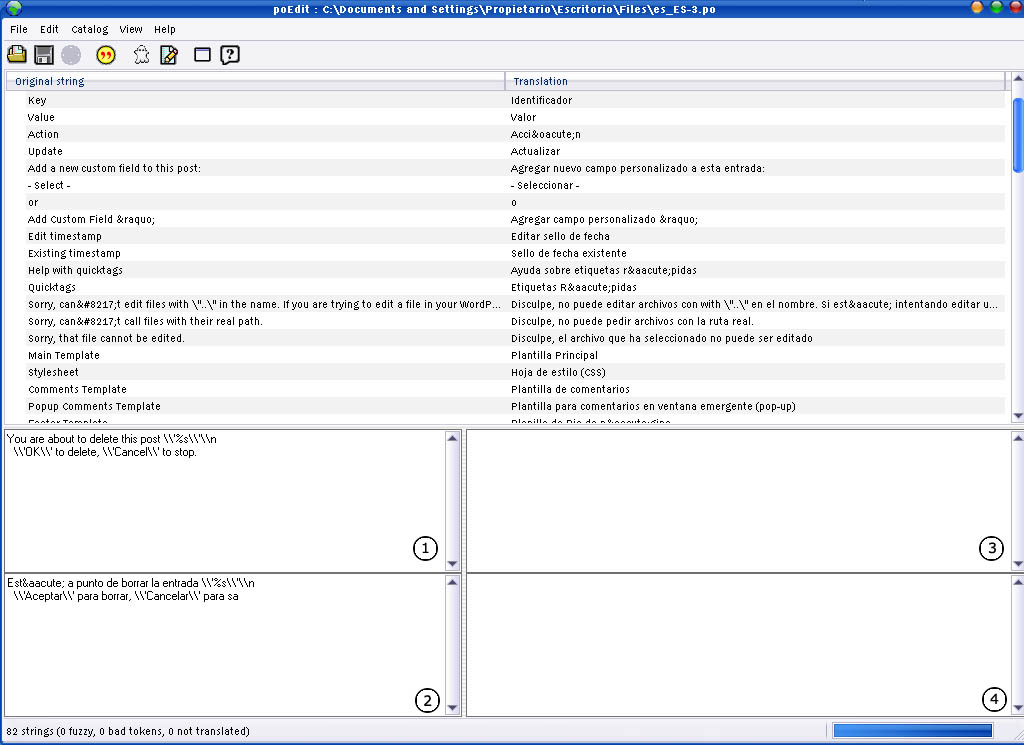
- Download and install poEdit. Download!
- Download the official WordPress POT file.
- Open the file in poEdit.
- (See Image) The box labeled (1) is the original message (in English) from the POT file. The box labeled (2) is where you add your translation. Boxes labeled (3) and (4) are used for adding comments about the messages. These come in handy if you are working with a team of translators and would like to pass around ideas through the PO file.
- Go to File → Save as… to save your translations in a PO file.
- When you are finished translating, go to File → Save as… again to generate the MO file.
- Or you can set your poEdit to always compile a MO file when saving changes by clicking File → Preferences and on the Editor tab check the Automatically compile .mo file on save box.

Hello! For any localization project, I recommend using https://poeditor.com/, which might be a better alternative to Poedit. This collaborative translation management platform has plenty of useful features (API, GitHub, Bitbucket, WordPress plugin) and an intuitive interface to simplify the localization workflow.
ReplyDeleteWhen your website or blog goes live for the first time, it is exciting. That is until you realize no one but you and your. WEBPROTIME
ReplyDeleteathemeart.com A very awesome blog post. We are really grateful for your blog post. You will find a lot of approaches after visiting your post.
ReplyDeleteMany individuals with a WordPress site can't help thinking about what to do when they see the notification in the WordPress administrator provoking them to move up to the most recent rendition.토토사이트
ReplyDelete